Images, videos, PDFs and links
Drop in images, videos, PDFs and web links. Scale freely and crop without losing anything, the original is always kept. Videos play right on the board, PDFs and links appear as preview cards.
A lean board for images, notes, sketches and arrows – no subscription.
This is SnipDot itself, not an illustration. The example board shows every tool in action: photos, notes, shapes, sketches, arrows, frames, a table, a link and a PDF. It’s read-only: try every tool, but nothing you change is saved.
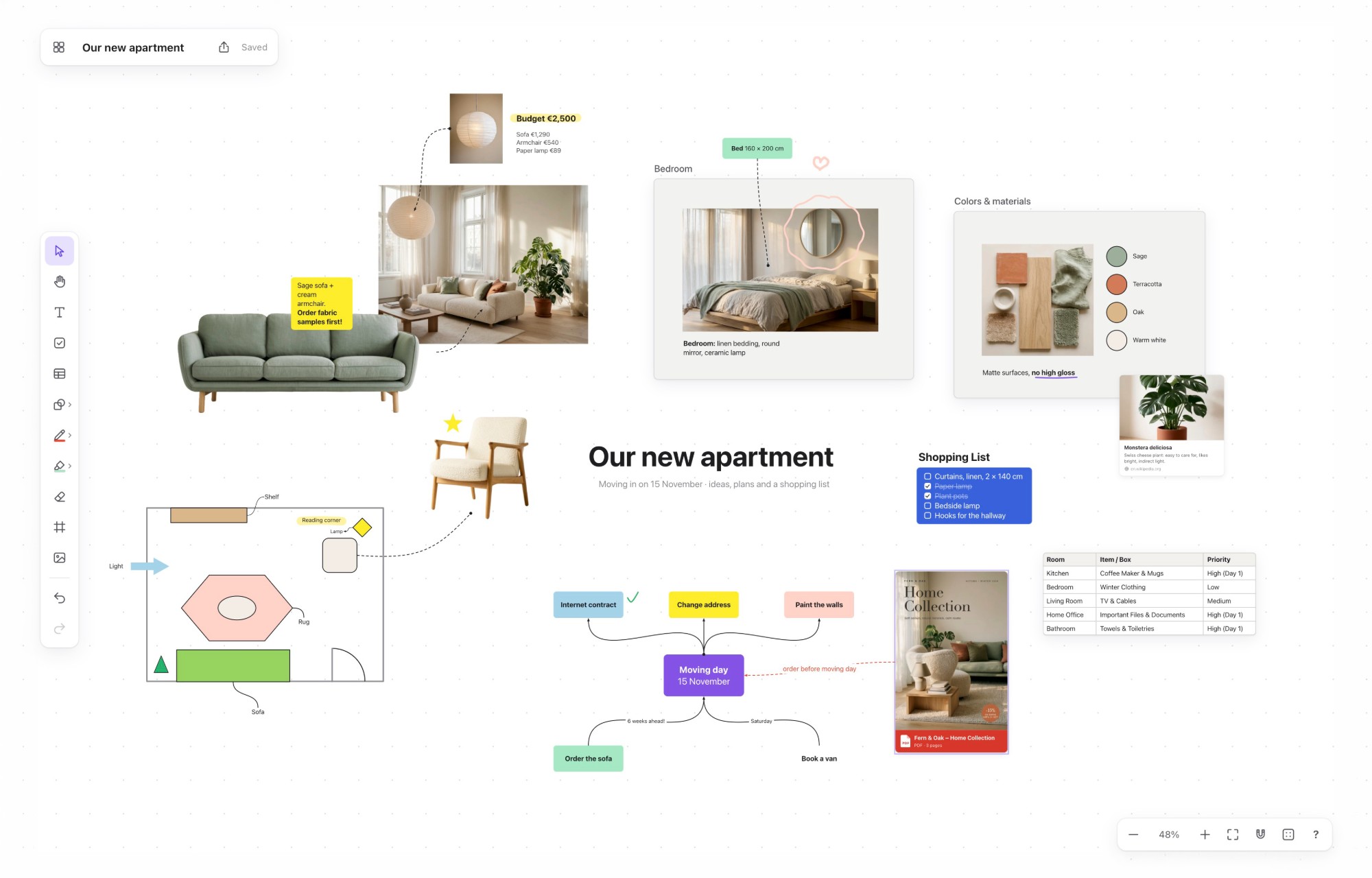
And nothing more: no templates, no plugins, no distractions. It works the way you expect: scroll to zoom, double-click to write.
Drop in images, videos, PDFs and web links. Scale freely and crop without losing anything, the original is always kept. Videos play right on the board, PDFs and links appear as preview cards.
Text boxes in any size, eight shapes and a palette of 13 colors.
Sketch with mouse, trackpad or Apple Pencil. The marker highlights without covering anything up.
Connect your ideas with arrows. They stick to your objects, follow them when you move things around and can carry a label.
Frame and name areas, group what belongs together and move it as one.
Sort boards into folders, find them by name and arrange them in your own order.
Share a board with a link, either to view or to view and edit. Others open it without a password and can work on it with you. They only ever see that one board.
One purchase, both versions. Pick one or use both – no coding required.
Open snipdot-installation.zip from your purchase. Inside are both versions – snipdot.zip for online and the desktop app for Mac and Windows – each with its own guide and short video.
On your own web space, in any browser, on every device.
Upload snipdot.zip in your hosting provider’s file manager and extract it there.
Open the address and choose a password. Your first board is waiting.
An app for your Mac or Windows PC. Your boards are plain files on your computer.
On a Mac, drag SnipDot into Applications. On Windows, run the installer. No hosting, no password.
Move the data folder into OneDrive, Dropbox or iCloud Drive to use your boards on several computers – Mac and Windows mixed.
| Feature | Online | Desktop |
|---|---|---|
| Every board toolImages, videos, PDFs, notes, sketches, mind maps | ||
| On your computer | Mac and Windows | |
| On tablet and phone | ||
| Same boards on several devices | via OneDrive, Dropbox or iCloud Drive | |
| Share links | ||
| Use with Claude | ||
| Works offline | ||
| Works without web hosting | ||
| Online needs web hosting with PHP 8.1 and SSL (not included). Desktop needs a Mac with Apple silicon and macOS 12 or later, or a PC with Windows 10 or 11. | ||
No account with someone else’s service. SnipDot lives wherever you put it.
Boards and images are plain files, on your own web space or on your computer. No database, no account with anyone.
Online, one password protects everything. The desktop app needs none – it runs only on your computer.
A backup as one ZIP file with all original images, and every board as a PDF too.
SnipDot runs in the browser on your computer, your tablet (Apple Pencil included) and your phone. What you change on one device is right there on the others.
Connect SnipDot to Claude and let it work on your boards. Ask in your own words – by voice on your phone or by typing on claude.ai – and Claude creates boards, sorts your notes, writes checklists and adds pictures from the web. Connect an image generator such as Higgsfield or Krea to Claude as well, and it can create brand-new pictures for your boards.
The short answers. The guides in the package explain every step in detail.
For the online version, your own web hosting with PHP 8.1 or newer and an SSL certificate – SnipDot is self-hosted software, and hosting is not included. For the desktop app, a Mac with Apple silicon (M1 or later) and macOS 12 or later, or a PC with Windows 10 or 11 (64-bit). No database, no command line, no coding.
Almost any regular web hosting plan, the kind that costs a small monthly fee. Website builders and hosting for static pages only won’t work, because they can’t run PHP. If you’re not sure, ask your provider whether PHP 8.1 and .htaccess files are supported.
For the online version you need an address with SSL, but not a new domain. A subdomain of a domain you already have works well, for example ideas.your-domain.com. Many hosting plans include a domain anyway.
No. You upload snipdot.zip in your hosting provider’s file manager, right in the browser, and extract it there. If your file manager can’t extract ZIP files, unpack it on your computer and upload the snipdot folder with an FTP app such as Cyberduck or WinSCP. Make sure the hidden files .htaccess and .user.ini come along.
The address doesn’t have an SSL certificate yet. Turn it on in your hosting account and wait a few minutes. Note that a wildcard certificate for *.your-domain.com covers ideas.your-domain.com, but not an address one level deeper like ideas.team.your-domain.com.
In the online version, delete the file config.php in the snipdot folder on your web space, then open your address and set a new password. Your boards and images are kept. The desktop app has no password.
No. Open the address of your online version in the browser. To start SnipDot like an app, add it to your home screen: in Safari on iPhone and iPad via the Share button, in Chrome on Android via the menu. The desktop app runs on computers only.
Yes, both come with one purchase. To move boards from one to the other, download a backup in one and restore it in the other.
As plain files: boards, images and your original files. In the online version they’re in the snipdot folder on your web space, in the desktop app in a folder on your computer that you can move, for example into Dropbox. Nothing is sent anywhere else. A backup puts everything into one ZIP file.
Download a backup first. Online version: upload snipdot.zip from the new package and extract it over the old one – your boards and your password aren’t in the ZIP file, so they stay untouched. Desktop app: on a Mac, replace SnipDot in Applications with the new one; on Windows, run the new installer. Your boards stay in their folder.
Online about 30 minutes, including the address and the SSL certificate – a new address sometimes needs a few extra minutes before it starts working. The desktop app is ready in a minute.
Move the data folder into Dropbox, iCloud Drive or OneDrive: in SnipDot, “…” → “Storage location and size” → “Change…”. On your other computer – Mac or Windows – choose the same folder. Make the folder available offline, and keep SnipDot open on one computer at a time – SnipDot warns you if it’s still open on another one.
On a Mac, if macOS says it can’t verify SnipDot, open System Settings → Privacy & Security and choose “Open Anyway” near the bottom. On Windows, if “Windows protected your PC” appears when you start the installer, click “More info”, then “Run anyway”. You only need to do this once.
Yes. The desktop app runs on Windows 10 and 11 as well as on Macs with Apple silicon, and the online version runs in any browser.
One purchase, both versions. Web hosting not included.